About this resource
New Year's decorations in different parts of the city.
 Skip to content
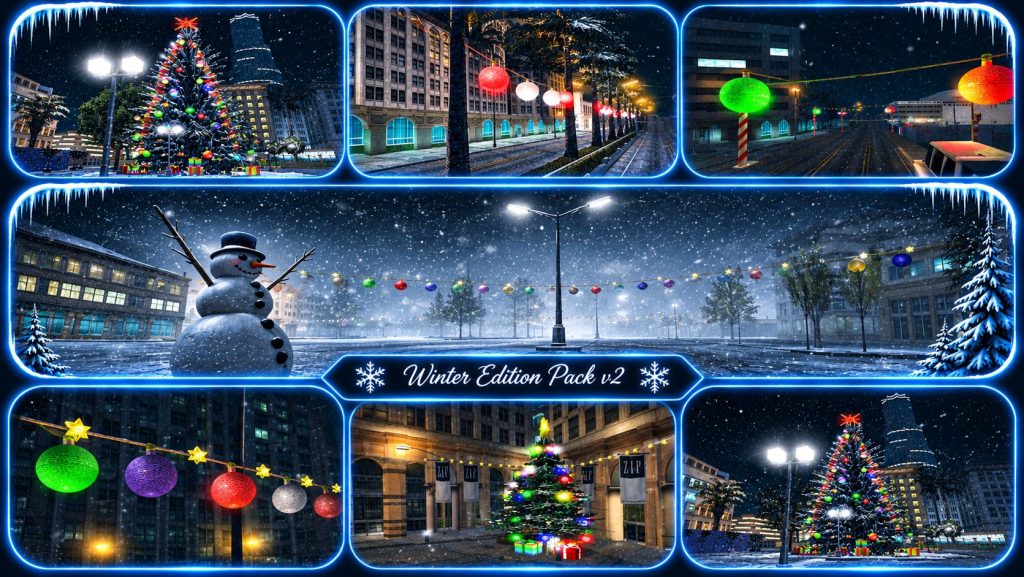
New Year's decorations in different parts of the city.
— · 0 Ratings & reviewsNew Year's decorations in different parts of the city.
# How to install your purchased SA-MP map
**1. Download the map**
Download the map files after purchase. Extract them if they come in a ZIP or RAR archive.
**2. Open the server files**
Open your SA-MP server files and locate your game mode in the “gamemodes” folder.
**3. Add the map**
Open your game mode in the Pawno editor and insert the purchased map content in the appropriate place.
**4. Check the required plugins**
If the map uses the Streamer plugin, install it correctly on your server so all objects load.
**5. Compile the game mode**
Save your changes and compile the game mode. Check that compilation finishes without errors.
**6. Restart the server**
Restart the server to load the changes.
**7. Check the map**
Join the server and visit the map location. Check that every object loads in the correct position.
**Note:** The map is for the purchaser only. Resale, sharing or public distribution requires the author's permission.
**Thank you for your purchase and trust!**
No published reviews yet.
Sign in / RegisterPlay connects to GTA Classics on laut.fm. The provider receives connection data. Live radio does not offer track skipping or seeking.
NonStop Radio · GTA Classics ↗Do not disturb is on. New private messages, live chat delivery and chat alerts are blocked. Choose Online to receive and send messages. Purchase and earnings notifications remain active.
Links, server addresses, profanity and harassment are not allowed in chat.